HELIOS / FACTION SYSTEMS WINDOWS · MACOS · LINUX · MOBILE WEB
HELIOS / FACTION OPERATIONS SYSTEM

One workspace.
Your whole faction.

Helios connects radio communications, operations, tactical maps, personnel, Joint Ops, and optional medical simulation in one synchronized desktop app.

One card for the faction Permission-aware tools Live Firebase sync
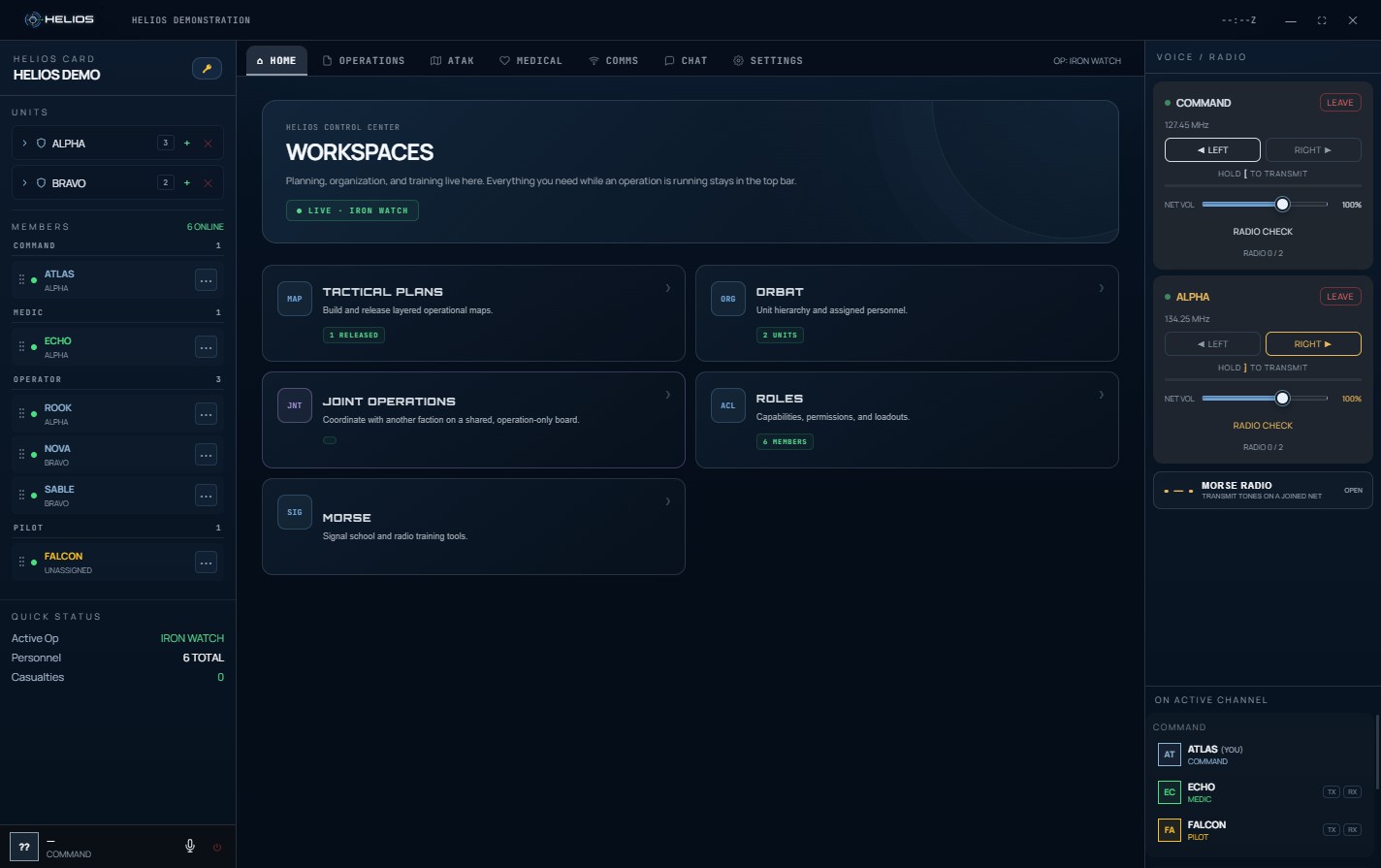
01 / HELIOS IN ACTIONVIEW FULL SIZE ↗
Actual Helios desktop workspace showing the current Home screen, faction roster, and two radio channels
Captured from Helios 1.9.50 with example faction data.
2simultaneous
radio nets
1synchronized
faction card
3medical tiers
when enabled
LIVEshared maps
and operations
ONE CONNECTED SYSTEM

Stop stitching the operation together.

Helios gives every tool the same operational context. Your roster, roles, active operation, radio nets, plans, and medical state stay connected instead of living in separate apps.

01

Run the operation from one place

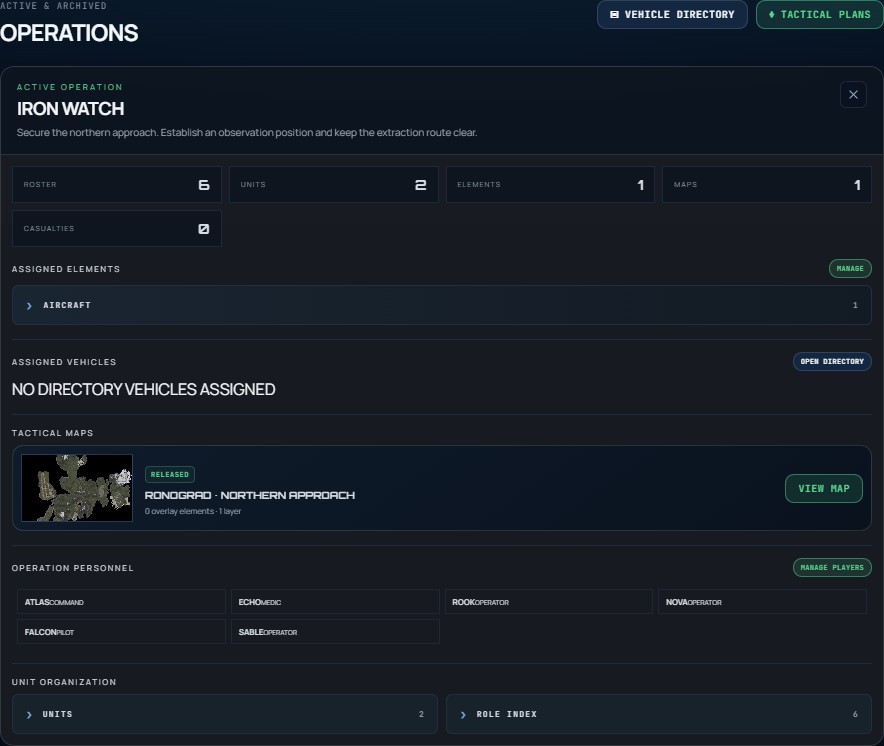
Create operations, assign elements and personnel, attach multiple tactical maps, and give everyone a clear view of what is currently active.

  • Operation-specific roster and callsigns
  • Elements grouped by type
  • Multiple maps per operation
Helios Operations screen showing an active operation, its roster, units, and released tactical map
Operations / current interface · view full size ↗
02
⌁

Tactical plans that stay editable

Build layered maps with symbols, tactical zones like AO and airhead, named lines and routes, bend points you drag into shape, grids, and phase layers — on your own map or the built-in Ronograd preset.

03
⌘

Roles that actually control access

Set who can plan, mark ATAK, use a radio, administer the card, and provide medical care. Role loadouts control the supplies issued to each member.

04
↔

Work with another faction

Host admins issue a one-time Joint Ops code. The partner faction's owner accepts it, and each side finds the active op from its own card. Representatives share allowed text items on an operation board; visitors do not enter the host card.

05
+

Train without spending supplies

Practise casualty care in the medical simulator. It uses your card's available medical tier and gives unlimited training supplies; live inventory still follows role loadouts.

DUAL-NET RADIO

Hear both nets.
At the same time.

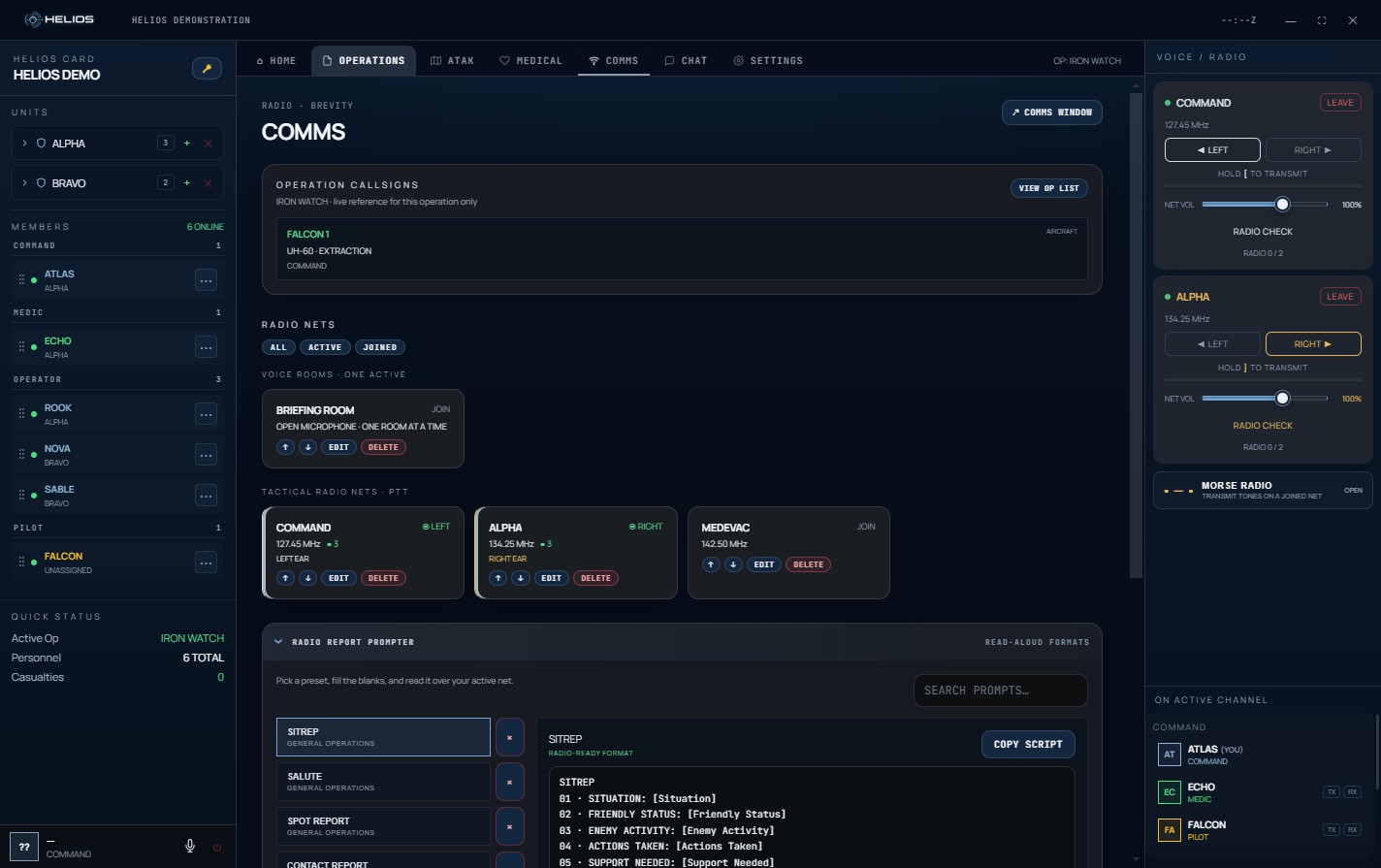
Helios places one radio net in each ear, so command and team traffic stay distinct without forcing you to switch channels or miss a transmission.

01

Independent left and right netsMonitor and transmit through both simultaneously.

02

Push-to-talk that stays availableGlobal PTT keeps comms usable while Helios is minimized.

03

Radio character, not clean voice chatPTT cue and a configurable radio filter make traffic easier to identify.

04

Channels locked to units or rolesRestrict a net or voice room to chosen ORBAT units or roles. Access is enforced on the server, so a locked channel stays locked.

05

Voice rooms and text channelsOpen-mic voice rooms sit alongside your push-to-talk nets, and card text channels keep command, medical, and air traffic in their own lanes.

02 / RADIO & VOICEVIEW FULL SIZE ↗
Current Helios Comms workspace showing tactical radio nets, left and right ear controls, voice room, and radio report prompter
Current Comms screen, with example channels.
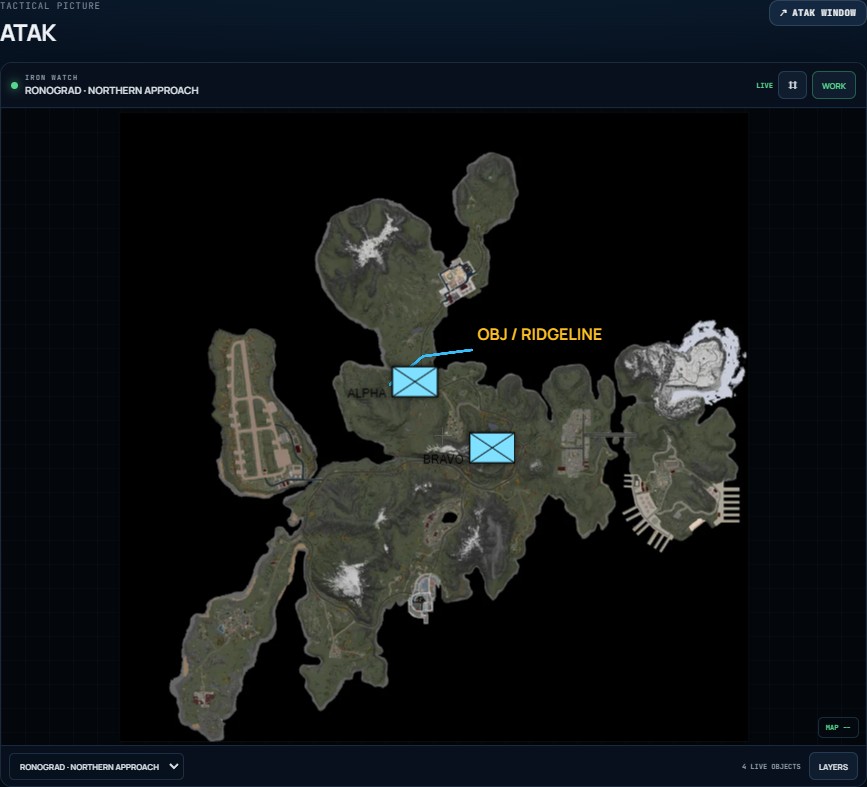
Actual Helios ATAK view using the built-in Ronograd map with example military symbols and a marked route
Ronograd map rendered by Helios ATAK.
SYNCHRONIZED ATAK

One live operational picture.
Every authorized screen.

Released operation maps become a synchronized chest overlay. Viewers can zoom and pan without changing anyone else’s view, while authorized markers update the shared picture in real time.

01

Live, map-scoped objectsMilitary symbols, tactical zones, named lines and routes, arrows, and labels stay attached to the correct operation map.

02

Separate view and marking rolesGive personnel situational awareness without automatically granting editing access.

03

Built for an active operationSwitch between released maps while each map preserves its own shared tactical layer.

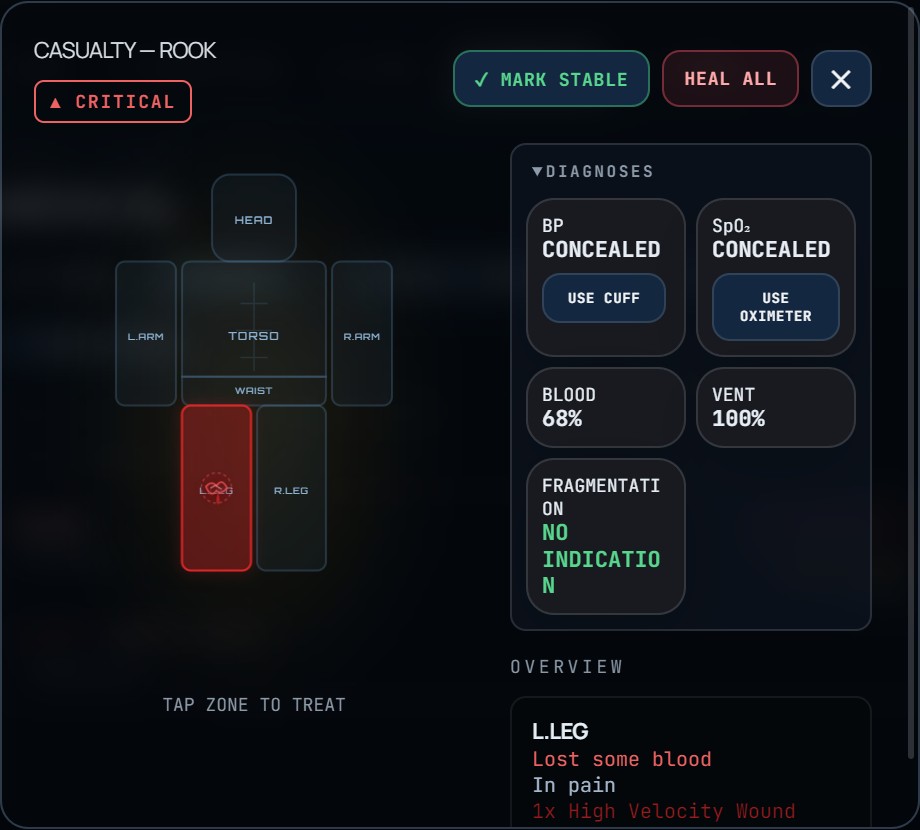
04 / MEDICALVIEW FULL SIZE ↗
Current Helios patient treatment screen showing the seven-zone body map, a critical leg wound, and Advanced diagnostics
Current patient card with example casualty data.
OPTIONAL MEDICAL SYSTEM

A staple when you need it.
Out of the way when you don’t.

Medical is optional for the faction. Base covers everyday casualty care; approved Advanced and Surgical cards add more detailed physiology, diagnostics, and hands-on treatment. A separate simulator lets members practise with unlimited training supplies.

BASE

Wounds, bandages, tourniquets, a chest seal, blood, medication, splints, and resuscitation.

ADVANCED

Waist and arterial wounds, QuikClot, vented chest seals, NDK, and timed pulse-ox and blood-pressure readings.

SURGICAL

Inherits Advanced care and adds surgical instruments and an unvented chest seal.

MADE FOR FACTIONS

Useful with medical.
Useful without it.

Helios is a connected workspace. A faction can run its own operations and comms, collaborate with an ally through Joint Ops, and use medical when its play style calls for it.

01Faction cardOne synchronized workspace → 02RolesAccess follows responsibility → 03OperationPeople, elements, and maps → 04Live toolsComms, plans, and medical
FREE BRM5 COMPANION TOOLS

Better calls.
Before you commit.

Plan your headquarters, find the right loadout, and compare vehicle builds in the Helios Guides library. Each tool works in your browser and can be downloaded for offline use.

Browse all Guides
SIMPLE ACCESS

Pick the time that fits your faction.

Every plan unlocks the same core Helios workspace. Longer plans simply reduce how often you need to renew.

WEEKLY
$1.50

7 days of Helios access.

QUARTERLY
$12

Renews every three months.

YEARLY
$50

Renews every year.

Want to try Helios first?

Ask an admin for a free 24-hour trial key. The clock starts when you create your faction card, not when the key is issued, so you get a full day of the complete workspace.

↻

Subscription control stays with you. Update payment details, switch plans, download invoices, or cancel through the customer portal. A canceled key remains valid through its already-paid expiration date.

Treat your key like a password. A Helios key can be redeemed once, by whoever has it. Only share it with people you trust. If a key is lost, leaked, or activated without your knowledge, it cannot be reissued, transferred, or refunded.

All sales are final. Helios does not offer refunds. Review the features, compatibility, billing interval, and terms before purchasing.

CURRENT RELEASE · 1.9.50

Install Helios.

View all release files ↗
Read this before installing on macOS — it will say “Helios is damaged” +

Current macOS builds are not yet Apple-notarized. Gatekeeper can show this warning even when the download is intact. Only use this workaround for Helios downloaded from the official release link above.

  1. Open the DMG and drag Helios into Applications.
  2. Open Terminal, paste the two commands below, and press Return.
sudo xattr -rd com.apple.quarantine /Applications/Helios.app
open /Applications/Helios.app

Enter your Mac password when prompted. Terminal does not display dots or characters while you type it.

Helios will then ask for Accessibility access. Allow it under System Settings › Privacy & Security › Accessibility — that is what lets push-to-talk work while your game has focus. The switch takes effect straight away; no restart needed.

After every Helios update: if push-to-talk stops working outside the Helios window, open that same Accessibility list, select Helios, remove it with the − button and add it back. Until these builds are Apple-signed, each new version has a different signature and macOS stops honouring the old permission — the switch still looks on, but it no longer applies.
QUESTIONS

Before you deploy it.

Does every faction have to use the medical system?+

No. Medical is optional. Operations, comms, plans, roles, ORBAT, and organization remain useful on their own.

Can one person listen to two radio nets at once?+

Yes. Helios can place one net in the left ear and another in the right, with both available simultaneously.

What happens when I cancel?+

Your subscription stops renewing, but the associated key continues working until the end of the period you already paid for.

How do advanced medical features work?+

Approved cards can use Advanced care, including artery wounds, QuikClot, and diagnostics. Surgical adds instruments and an unvented seal. Base keeps its simpler treatment model, and all cards can practise within their own tier in the simulator.

Can two factions share an operation?+

Yes. A host admin issues a one-time Joint Ops code for the partner faction's owner. Both factions see the shared operation from their own cards, while their private card records stay separate.

Can I change the desktop interface?+

Yes. Settings lets you switch between the newer Signal look and the original Legacy interface. That choice stays on your device; the faction's tools and permissions stay the same.

Can members edit everything?+

No. Card roles and permission checks control access to administrative, planning, medical, radio, and organizational actions.

BRING IT TOGETHER

The operation already has enough moving parts.

Give your faction one place to coordinate them.

SECURE CHECKOUT

Monthly access

$5 / month

1Stripe checkoutPayment and billing details 2Firebase licenseA working key is created 3Open HeliosRedeem the key in the app

You will continue to Stripe for secure billing. Your working Helios key is issued after payment.